Creative Fidget Builder Workshop
Reviews
Creative Fidget Builder Workshop offers a focused creative outlet for children. The blank template and shape toolbar make starting easy, while independent coloring of each part and a pattern library provide real depth. The spin test gives immediate visual feedback, and the personal gallery encourages iterative design. Sharing is simple and safe, with no scores or pressure. It suits young makers who enjoy customization and visual experimentation, though it lacks competitive goals.
Description
Starting with a Blank Spinner
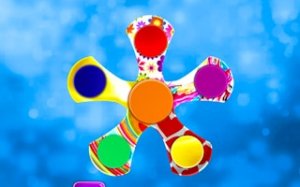
Every project begins with an empty spinner template. A side toolbar presents core shapes, from classic three-arm designs to star-like forms. Selecting a shape sets the foundation, and the workspace stays uncluttered so attention remains on the creative task. No prior experience is required, which makes the workshop approachable for beginners while still allowing room for experimentation.
Coloring Arms and Patterns
Customization goes deep. A color wheel offers hundreds of shades, from bright primaries to soft pastels. A pattern library adds stripes, polka dots, gradients, and geometric motifs. Each part of the spinner can be colored independently, including the central bearing cap and each arm. Real-time previews let players see how combinations look before committing to a final design.
Testing the Spin
When the design is ready, a virtual spin button brings it to life. The animation shows the spinner rotating smoothly, revealing how colors and patterns blend in motion. This immediate feedback highlights visual appeal. If something does not look right, players can return to the editing screen and adjust. The testing phase encourages iterative improvement, a valuable habit in any creative process.
Saving and Sharing Creations
Finished designs can be saved to a personal gallery. Each saved spinner becomes part of a growing collection that reflects the player's evolving style. The gallery is easy to browse, allowing players to revisit and compare past creations. Players can also share their favorite designs with others. The sharing system is simple and safe, focusing on showcasing the artwork rather than personal information. Viewing designs from other players can spark new ideas and inspire different color combinations or shape choices. There are no scores or competitions, so the social aspect adds motivation without pressure.
Compatibility
Faq
Is Creative Fidget Builder Workshop suitable for young children?
Can I save multiple spinner designs?
How many colors and patterns are available?
Can I share my spinner designs with friends?
Is there a way to test how the spinner looks in motion?
Does the game have any competitive elements or scores?
Handpicked Games

Route Sketch Puzzle Adventure

Road Builder Logic Challenge

Shape Match Logic Puzzles
Creative Fidget Builder Workshop
Ocean Fantasy Dress-Up for Kids
Whimsical Circus Style Studio
Bridal Celebration Styling Planner
Stellar Style Studio
Frozen Treat Creator Studio
Editorial Notes