Stellar Style Studio
Reviews
Stellar Style Studio works best for families seeking a low-pressure creative activity. The absence of timers, scores, or wrong answers removes performance anxiety, and the celestial wardrobe offers enough variety to hold attention across multiple sessions. Because it runs in a browser without installation, access is simple on shared devices. The main limitation is that the game is purely a design tool; children who expect goals or challenges may lose interest quickly.
Description
Building an Outfit
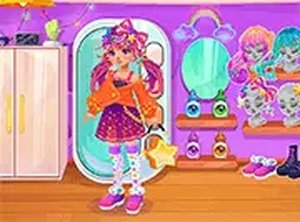
Stellar Style Studio opens with a character and a wardrobe of celestial-themed pieces. Children pick dresses, tops, bottoms, shoes, and jewelry decorated with stars, moons, and planets. Every selection is a simple click or tap, and the chosen item appears immediately on the character. The interface avoids nested menus and complex steps, so a young player can start mixing pieces without adult guidance.
Accessories and Hairstyles
Beyond the main clothing categories, the game supplies earrings shaped like moons, necklaces resembling planets, and props such as star wands or glowing halos. Hairstyles can also be swapped, which changes the overall silhouette of an outfit. Because each accessory is visually distinct, children can quickly spot the piece they want and experiment with layering. The number of possible combinations encourages repeat sessions as new pairings are found.
Creative Freedom Without Rules
There is no requirement to match colors or follow a specific theme. Players can mix patterns and textures freely, and the game never marks a choice as wrong. This absence of scoring or timers means a session lasts as long as the child wants. The open structure also suits siblings or friends who take turns and compare results, adding a social layer without competitive pressure.
Saving and Sharing Designs
Finished outfits can be saved through the game's capture feature or a device screenshot. No account creation is needed, so sharing with family or keeping a personal gallery stays simple. Parents can help younger children save images, turning the process into a collaborative activity. Revisiting saved looks gives players a reason to refine designs over time.
Playing on Any Device
Stellar Style Studio runs entirely in a web browser, so there is nothing to download or install. It works on mobile phones and desktop computers, with controls that adapt to touchscreens or mouse input. The game loads quickly and does not demand a fast internet connection, which makes it easy for families to fit into a routine without technical hurdles.









Editorial Notes