Frozen Treat Creator Studio
Reviews
Frozen Treat Creator Studio delivers a straightforward creative outlet: pick a base, choose a shape, and decorate with drag-and-drop candies. The lack of limits on toppings encourages experimentation, and the bright cartoon style suits younger audiences. It runs smoothly in modern browsers without downloads or registration, making it highly accessible. The main limitation is depth—there is no progression or challenge beyond designing and sharing. It works best as a relaxing, pick-up-and-play activity rather than a goal-driven game.
Description
Building a Dessert from Scratch
Every design in Frozen Treat Creator Studio starts with two foundational choices. First, you select a base color from several chocolate-inspired shades. This choice sets the visual tone for the entire dessert. Next, you pick a shape from a curated set of outlines, ranging from classic rectangles to more whimsical silhouettes. These early decisions determine the character of your treat before any decoration begins.
Decorating with Precision
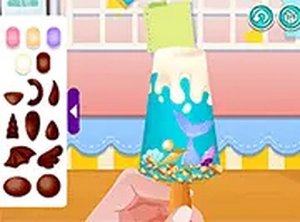
Once the base and shape are locked in, the decorating phase opens up. A palette of small candies, sprinkles, and other toppings appears on screen. Using a mouse or touch input, you drag and drop these items onto the dessert surface. The interface supports precise placement, so each piece lands exactly where you intend. There is no cap on how many items you can add, which encourages experimentation with patterns, color combinations, and density. [IMG_1]
Visual Style and Accessibility
The game uses bright, saturated colors and a clean, cartoon-like look. Every element, from the glossy base to the tiny candies, keeps the focus on creativity rather than realism. Because it runs entirely in a browser without plugins or downloads, it works on desktops, laptops, tablets, and smartphones. Touchscreen users get intuitive drag-and-drop controls, while desktop players can rely on mouse precision. No installation or registration is needed to start.
Sharing Your Creations
After finishing a design, you can capture a screenshot and upload it to your personal profile within the game platform. This sharing feature lets others view and appreciate your work, fostering a community of creators. The process is straightforward and does not require any external accounts or complex steps.




Editorial Notes