Tasha's Art Studio Coloring Book
Reviews
Tasha's Art Studio succeeds by keeping things simple. The single coloring page with a friendly hippo character offers just enough detail to engage young artists without overwhelming them. The click-to-fill mechanics are intuitive, and the lack of timers or scores removes any performance anxiety. Parents will appreciate the save function, which lets children build a portfolio of their work. While the game has only one image, the open-ended color choices encourage repeated play. It is a well-designed tool for developing fine motor skills and color recognition in a relaxed setting.
Description
Creative Canvas Setup
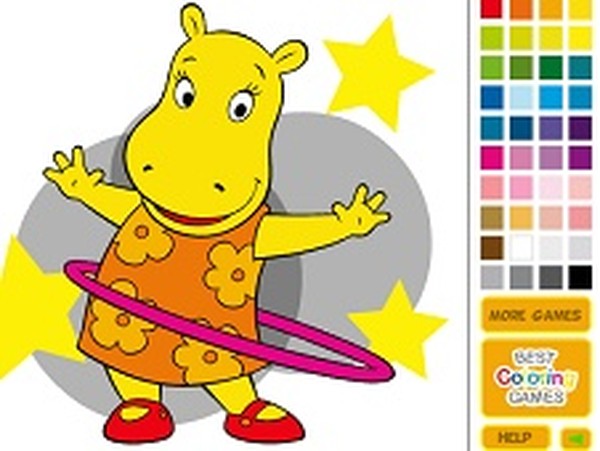
Upon opening the game, players see a line drawing of Tasha, a friendly hippo character, positioned in the center of the screen. A circular frame surrounds her, ready to be filled with color. On the right side, a palette of basic colors is displayed. The interface is minimal and uncluttered, allowing young children to focus on the coloring task without distractions. The design encourages experimentation with color combinations.
Coloring Mechanics
To apply color, players first click a shade from the palette, then click the area they wish to fill. The selected region instantly takes on the chosen hue. This straightforward click-and-fill system works well for small hands and limited motor skills. Players can color Tasha's dress, the popcorn she holds, the circular background, and other distinct sections. The process is entirely self-paced, with no timers or scores to create pressure.
Artistic Freedom and Guidance
While the game provides a reference image showing the original color scheme, players are free to choose any combination they like. This dual approach supports both structured learning—matching colors to the original—and open-ended creativity. Children can practice color recognition by trying to replicate the example, or they can invent their own palette to make a unique version of Tasha. The undo and redo buttons allow easy correction of mistakes.
Preservation and Sharing
Once a coloring is complete, the game offers a save function. Finished artwork can be stored as an image file on the device. This feature enables children to share their creations with family members or keep a personal gallery of their work. The ability to save also encourages repeated play, as kids can try different color schemes and compare results over time.