Community Shield: Tower Defense Strategy
Reviews
Community Shield offers a satisfying tower defense experience with multiple tower types and upgrade options. The bonus attacks add a fun twist, and the family-friendly design makes it suitable for all ages. The strategic depth keeps you engaged as zombies approach from various directions.
Description
Game Introduction
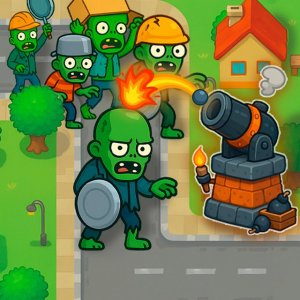
Community Shield: Tower Defense Strategy is a planning-focused game where you protect a residential area from waves of approaching zombies. The game presents a map of your neighborhood, with zombies advancing from multiple directions. Your goal is to install defensive towers at marked spots along the roads. Each tower type has a unique tool: an archer fires arrows, a soldier uses a projectile launcher, another tosses area-effect items, and a fourth shoots powerful energy beams. You can place as many towers as you like to create a strong defense line. Every zombie you defeat earns rewards that you can use to add more towers. Plan your defense carefully because zombies can attack from any street. Between rounds, you can level up your towers to handle stronger enemies. Bonus attacks are available, such as the zipper icon to target groups of zombies or the barrel icon for an area strike on clusters. This game is family-friendly and works well on any modern browser.
How to Play
To play, start by examining the map to see where zombies are coming from. Click on the marked locations along the roads to choose and install your defensive towers. Each tower type has a special tool: archer, projectile launcher, area-effect item, or energy beam. Build as many towers as possible to block all paths. After defeating zombies, collect rewards to add more towers. Between rounds, upgrade your installations to boost their power against stronger enemies. Use bonus attacks by clicking the zipper icon on the left, then select a zombie group to hit. Alternatively, click the barrel icon and choose a spot where zombies gather to launch an area strike. Plan your strategy to defend every street and keep your neighborhood safe.
Game Features
Game features include multiple tower types with unique tools. An upgrade system lets you improve towers between rounds. Bonus attacks like the zipper and barrel give you extra ways to stop zombies. The game is family-friendly with no violent or inappropriate content. It runs smoothly on any modern browser without downloads.
Tips for Success
You will enjoy the strategic depth of placing towers and managing upgrades. The simple controls make it easy to start playing right away. Each round offers a new challenge as zombies come from different directions. It is a rewarding way to spend a few minutes or longer sessions.
✅ Compatibility & Testing
Faq
Can I play Community Shield on my mobile phone?
The game is designed for modern browsers and may work on mobile devices, but it is optimized for desktop or laptop computers for the best experience.
Are there different difficulty levels in Community Shield?
The game may include varying difficulty as rounds progress, with zombies coming from different directions. Some versions of this game type offer adjustable difficulty settings.
Does Community Shield require an internet connection?
As a browser-based game, it requires an internet connection to load and play. Once loaded, some features may work offline, but a connection is needed to start.
Is there a story or campaign mode in Community Shield?
The focus is on strategic tower placement and defense. Some games of this type include a campaign with multiple levels, but the specific story elements are not detailed in the available information.
Can I save my progress in Community Shield?
Browser games often save progress automatically using cookies or local storage. Check your browser settings to ensure data is saved between sessions.
Are there any in-game purchases in Community Shield?
The available information does not mention purchases. Many browser games are free to play, but some may offer optional upgrades. Check the game's official page for details.