Truck Inspector Simulator
Reviews
Truck Inspector Simulator focuses on a specific loop: examine truck parts, verify their condition, then drive the vehicle through a city. The mouse-driven camera and guided steps make the inspection process accessible, while color changes and engine sound options add personalization. The test drive provides a practical payoff. It suits players who prefer careful, detail-oriented simulation over fast-paced action. The main limitation is that the experience centers on inspection and driving, so those seeking broader management or multiplayer features may find it narrow.
Description
Inspection as the Core Task
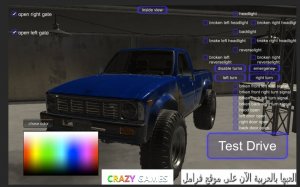
Your main job in Truck Inspector Simulator is to examine each part of a truck to confirm it meets safety and performance standards. This covers both the interior and exterior, so you'll rotate the camera, zoom in on specific components, and check their condition and parameters. The game guides you through each step, which makes the process approachable even if you haven't played a detailed simulation before. [IMG_1]
Tools and Camera Control
Interaction happens primarily through the mouse. You can orbit the camera around the truck for a full view and zoom in when a part needs a closer look. This control scheme supports the inspection loop: find a component, examine it, and verify its readings. Because the camera moves freely, you can inspect areas that would be hidden from a fixed angle. [IMG_2]
Customization Options
Before or after inspection, you can change the truck's color and select from a range of engine sounds, including i4 and V8 types. The game also lets you adjust the truck's settings for a more personalized experience. These options don't replace the inspection work, but they give you a reason to spend time with the vehicle beyond checking boxes. [IMG_3]
Test Drive in the City
Once the inspection is complete, you can take the truck for a test drive around a large city. Driving uses standard keyboard controls such as WASD or arrow keys, and you may be able to change the camera angle while driving. The test drive serves as a practical follow-up to the inspection: you get to feel how the truck performs after you've examined its parts. [IMG_4]
Compatibility
Faq
What do I actually do in Truck Inspector Simulator?
Can I customize the truck in Truck Inspector Simulator?
What controls does Truck Inspector Simulator use?
Is Truck Inspector Simulator educational?
Do I need simulation game experience to play?
What happens after I finish an inspection?
Handpicked Games

City Tycoon: Property Simulator

City Bus Driving Sim 3D
Prado Precision Parking Challenge

Fish Friends Puzzle Adventure

Dino Quest: Fossil Discovery Puzzle

City Driving Simulator Arcade

Farm Tractor Parking Challenge

Fruit Word Scramble Puzzle Game
Offroad Muddy Truck Exploration
Editorial Notes