Game Introduction:
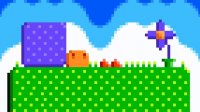
Towering Trials is an engaging vertical-scrolling platformer that challenges players to jump, dash, and fly to the finish line across various levels. This game blends creativity with skill, making it a perfect pick for platformer enthusiasts who enjoy challenging gameplay and the freedom to create and share custom content. Players can choose from several prebuilt levels in any order, with a visual difficulty guide using animated faces that show how complex each level is. The more anxious the face, the tougher the challenge. Whether you are a beginner or a seasoned player, Towering Trials offers a fun and rewarding experience for all ages.
How to Play:
Use the W or up arrow key to jump or fly, A or left arrow key to move left, and D or right arrow key to move right. Press P or Tab to pause the game. In the editor, click on the type of tile you want to place, and use group buttons like block or spike to choose tile categories. If a tile has a green outline, it is selected. Use the mouse to lay or select multiple tiles by dragging, or scroll to move the camera view. Keyboard shortcuts like WASD move selected tiles, Shift+WASD moves them by 1/16 of a grid block, and Alt+WASD moves them by 1/2 grid. Use Q and E to rotate blocks, and Ctrl+S to save your level.
Game Features:
Flexible level selection, creative level editor, dynamic movement mechanics, and skill-based gameplay.
Game Conclusion:
Towering Trials is a delightful platformer that combines skill, creativity, and endless replayability. Perfect for players who love to jump, dash, and design their own adventures.