Sketch Path Puzzle
Reviews
Sketch Path Puzzle stands out for treating drawing as a genuine puzzle tool rather than a gimmick. Because every stroke becomes part of the physics simulation, players can solve stages in multiple ways, and the game never punishes a wrong line. The gradual introduction of moving platforms and traction-changing surfaces keeps the challenge growing without overwhelming. Its minimal interface and lack of required reading make it broadly accessible, though players seeking timed challenges or competitive modes will not find them here.
Description
Drawing as the Core Tool
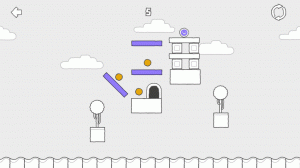
In Sketch Path Puzzle, the solution to every stage is literally in your hands. Using a finger on touchscreens or a mouse on computers, you draw lines, ramps, and barriers that become physical objects in the game world. A ramp changes the ball's speed, a straight line redirects its path, and a barrier stops it from rolling somewhere you don't want. There is no single correct answer. Multiple drawings can solve the same puzzle, which pushes players toward experimentation rather than guessing the developer's intended route. Mistakes carry no penalty, so you can erase and redraw as many times as needed. That freedom turns each stage into a personal creative challenge.
How Difficulty Unfolds
Early puzzles stick to basic ideas: a straight ramp, a simple gap, a clear target. As you move forward, the game introduces moving platforms, rotating obstacles, and surfaces that alter the ball's traction. New mechanics appear through play rather than through text explanations, so you learn by testing. Each stage works like a small workshop where you refine your drawing until the ball reaches the goal. Optional hints are available if you get stuck, but they are never forced on you, which preserves the satisfaction of solving a puzzle on your own.
Visual Style and Atmosphere
The hand-drawn art gives Sketch Path Puzzle a warm, approachable look. Soft background colors and playful doodles match the drawing mechanic, while the ball and objects carry a sketch-like quality that fits the theme. Animations are smooth but simple, keeping attention on how the physics interact. There are no distracting effects or loud sounds. The visual design supports a relaxed tone, making it comfortable to play for extended periods without fatigue.
Controls and Accessibility
The interface is minimal: a drawing tool, an eraser, and a play button. Controls respond quickly, so there is no lag between drawing a line and seeing the ball react. The game works equally well on tablets, phones, and computers. Text is large and clear, and menus are straightforward. No reading is required to understand the core gameplay, which makes it accessible to younger children and non-native English speakers alike.







Editorial Notes