ZigZag Path

Skill Reflexes Timing Precision Arcade Casual Family-Friendly
ZigZag Path
86
Developer: Branch Interactive
Published: 2025-11-14
Updated: 2026-11-18

Reviews

ZigZag Path succeeds by removing almost everything except a single decision: when to tap. The diagonal movement, obstacle placement, and coin pickups create a clean risk-reward loop, and the rising difficulty keeps short sessions meaningful. Its browser-only, no-download setup lowers the barrier further. The main limitation is depth, since the input describes no modes, characters, or story, so players wanting variety may find it thin.

Description

What You Actually Do

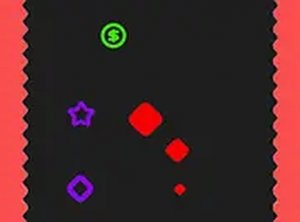
ZigZag Path keeps its rules minimal. A moving icon travels diagonally across a colorful path, and your only input is a tap or a mouse click. Each tap changes the icon's direction. The challenge is not deciding what to press but when to press it, because obstacles sit along the path and a mistimed tap sends the icon into one. Coins appear along the route, and collecting them adds to your score. [IMG_1]

Why Timing Beats Speed

The game is built around precision rather than rapid input. Because the icon moves at a steady diagonal angle, the useful skill is reading how close the next obstacle is before committing to a direction change. Players who tap early tend to drift into blocked sections; players who wait too long run out of room. That single tension between hesitation and reflex is what gives short runs their weight.

Coins, Themes, and Progression

Coins serve two purposes. They raise your score during a run, and they accumulate toward unlocking new visual themes. That gives the game a light long-term goal beyond a single attempt, though the input does not specify how many themes exist or what they cost. The safer approach is to collect coins that sit naturally on your route and skip risky detours, since a crash ends the run and wipes out the progress you were building. [IMG_2]

Where It Runs and Who It Suits

ZigZag Path runs directly in a browser on Android, iOS, and desktop with no download and no registration. Sessions are short by design, which makes it a reasonable fit for a spare minute rather than a long sitting. Difficulty rises over time, so the game rewards patience and repeat attempts more than raw reaction speed. Its family-friendly presentation and one-touch control also make it easy to hand to a younger player.
Editorial Notes

Compatibility

This H5 game runs smoothly on:
• Desktop computers (Windows / Mac) • Mobile phones (iPhone / Android)
• Tablets (iPad / Android)
🌐 Best experienced with Chrome, Safari, or Edge

Faq

Do I need to download or install ZigZag Path?
No. ZigZag Path runs directly in a web browser on Android, iOS, and desktop. There is no download step and no registration required, so you can open it and start playing immediately. That also means your progress is tied to the browser session rather than a separate installed application.
Is ZigZag Path suitable for children?
The game is described as family-friendly and uses a single tap or click as its only control, which makes it approachable for younger players. There is no account creation and no downloadable content. Parents should still note that difficulty increases the longer a run continues, which can frustrate very young children.
What is the point of collecting coins in ZigZag Path?
Coins add to your score during a run and also count toward unlocking new visual themes. Since a crash ends the run, chasing every coin is risky. The practical approach is to take coins that already sit on your intended route and leave the ones that force an awkward direction change.
Can I play ZigZag Path with a keyboard?
Based on the available description, the game is controlled with a single mouse button or a screen tap. A keyboard control scheme is not mentioned. On desktop, that means using the mouse; on mobile, tapping the screen. Treat the one-touch input as the intended way to play.
Why does ZigZag Path get harder as I keep playing?
The game is designed with increasing difficulty, so the pace and obstacle pressure rise the longer a run lasts. This is what turns a simple one-tap mechanic into a test of patience and timing. Short, regular sessions tend to help more than one long attempt, because fatigue hurts your tap timing.
Is there a way to practice ZigZag Path without losing quickly?
The description suggests starting slowly and gradually building speed, which mainly means giving yourself time to read the path ahead before tapping. Focusing on the upcoming section of the path rather than the icon itself helps you anticipate obstacles. Beyond that, no separate practice mode is mentioned.